How paying with crypto through Apple Pay and Google Pay works

You tap your phone at the coffee shop, the reader beeps, and the payment goes through in a second. The experience is much like any other contactless payment. But if the money behind it started as a stablecoin balance, a few things happened between your tap and the receipt. Before setting up a crypto card Apple Pay connection for everyday spending, here's what happens behind the scenes.
This guide walks through the process: adding a virtual card to your phone's wallet, choosing what funds it, tapping to pay, and what to do if your phone goes missing.
TL;DR
- The merchant is paid in ordinary currency over the Visa network. Your stablecoins are converted to fiat behind the scenes, so the shop never handles crypto.
- On Clapp, the virtual card converts USDT or USDC from your balance, so you can spend without manual selling.
- Adding the card takes a few minutes. Choose "Add to Apple Pay" or "Add to Google Pay" in the app, then confirm on your phone.
- The card is USD-denominated, so purchases in other currencies involve a currency conversion. Clapp charges no conversion fee at checkout and no monthly fee, but standard Visa fees can apply.
- Declines usually have simple causes: low balance, the wrong default card in your phone, a spending limit, or a frozen card.
- If your phone goes missing, freeze the card from another device in seconds, then add it to your new phone once you're set up.
How a crypto card works at checkout
The first thing to understand is that the merchant never sees "crypto." When you use a crypto card Apple Pay setup, the terminal processes a normal card payment on a network like Visa. The shop gets paid in ordinary currency, the same way it would if you'd paid with a bank debit card.
The difference is what happens inside the app. The stablecoins you've used to fund the card are converted into the currency the merchant accepts when you pay. That conversion is what lets a crypto holding behave like spendable cash at the till, without you selling anything manually first.
So you're not paying "in crypto." You're paying with fiat converted on the spot from a balance you control, and the card is the link between the two.
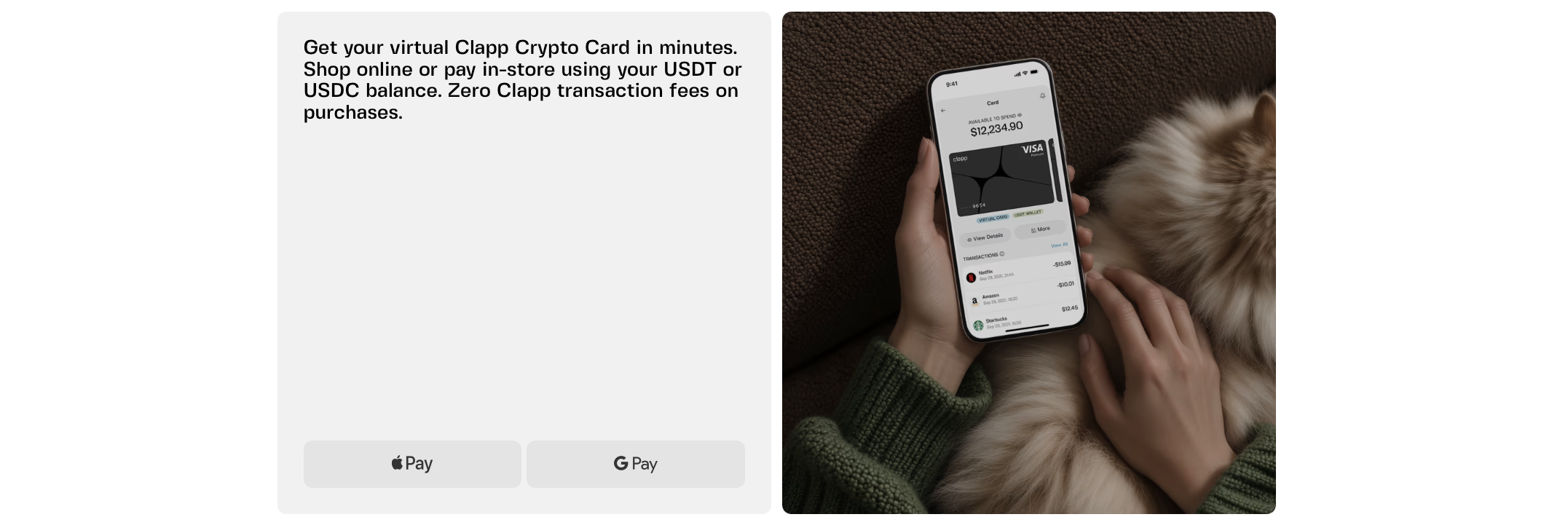
Adding crypto card to Apple Pay, step by step
Getting a virtual card into your phone's wallet takes a few minutes, and every step happens on screen.
- Open your Clapp app and go to the card section. If you already have a virtual card issued, you'll see its number, expiry, and CVV displayed right there, ready to use for online purchases too.
- Tap "Add to Apple Pay" or "Add to Google Pay." Your phone's wallet app opens automatically and asks you to confirm the card details. This is the moment the card is added to your phone. After this step, it lives in your wallet the same way any other card would.
- Confirm on your phone. Apple and Google both run their own verification step (a code, a face scan, whatever your phone normally asks for), the same check they run for any card.
- Choose what funds your card. Use USDT or USDC from your Clapp Wallet to fund the card. If you want to use your crypto-backed credit line, first withdraw the borrowed stablecoins to your Wallet. Note that interest and LTV rules apply.
- You're set. The card now shows up in your phone's wallet, ready for tap-to-pay.
Nothing about this process asks you to move coins to an exchange or wait for a transfer to "clear." The card is already linked to the balance sitting in your wallet.
What happens when you tap to pay
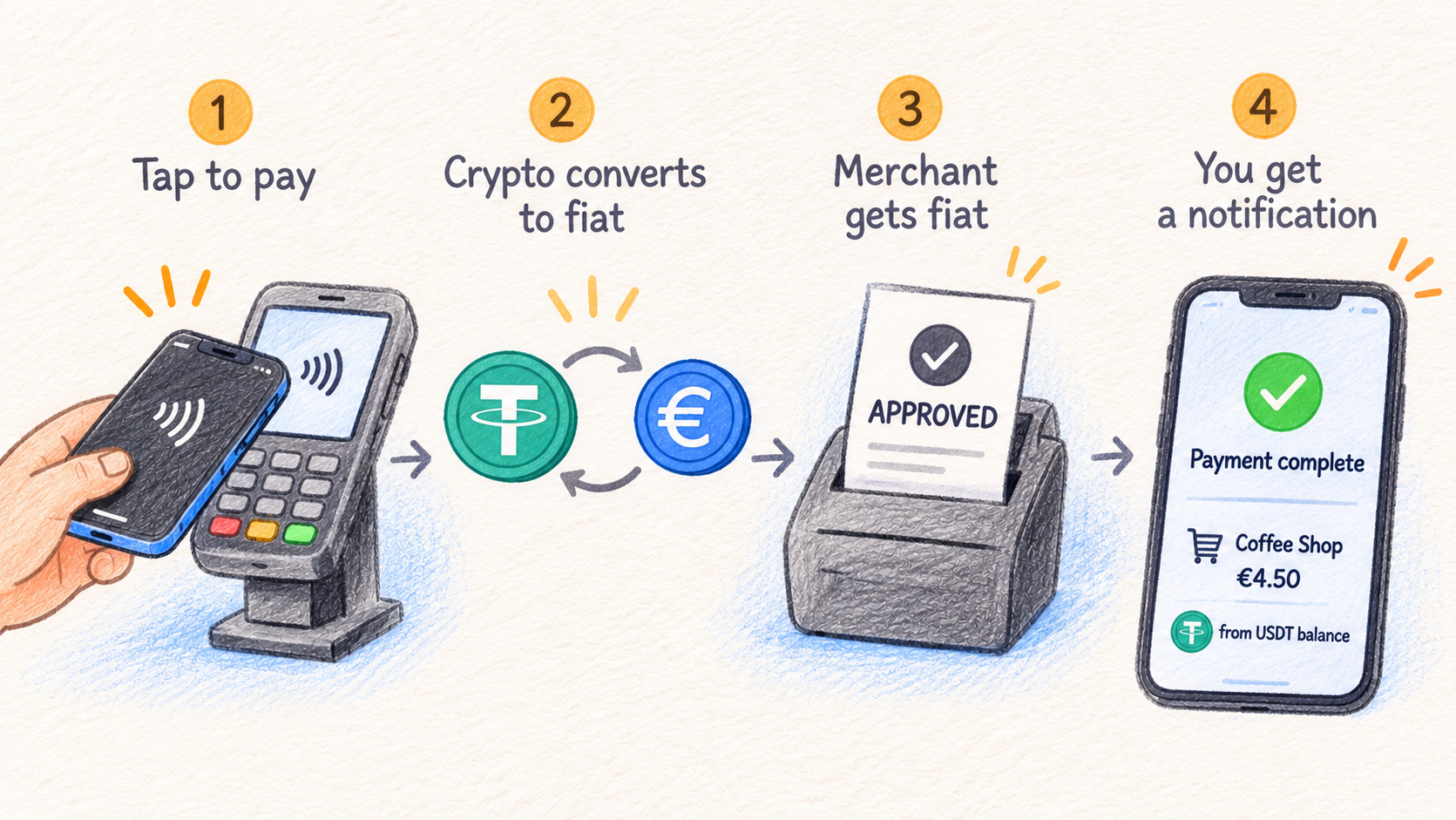
The only part that feels different from a normal debit card is the conversion, but it happens quickly enough that you don't experience it as a separate step. Here's what happens:
- You tap your phone at the terminal. The transaction request goes out over the card network, exactly like a contactless card payment.
- Your stablecoins convert to fiat. Behind the scenes, the spending amount is converted from your stablecoin balance into the currency the merchant accepts, at the rate available at that moment.
- The merchant receives fiat. They see a Visa transaction and a settled amount in their own currency, with nothing on their side that says "crypto."
- You get a notification. An alert shows up in your app moments later, showing the merchant name, the amount charged, and the balance it came from. If you're watching your phone, you'll usually see it before you've put your phone away.
What if the crypto price moves right before you pay?
This is the question almost everyone asks eventually. On Clapp, the card spends converted stablecoins, so the amount debited stays close to the purchase price even when the market is volatile. A $4 coffee costs you about the same in USDT or USDC today as it did last week.
The card is USD-denominated, though, so a purchase in euros or another currency goes through a foreign exchange conversion. The exact amount debited depends on the rate applied at that moment, so check the figure in the app. All applicable fees are also listed in the Help Centre.
If you fund the card with stablecoins withdrawn from a credit line, the coffee still costs the same, but your collateral remains exposed to market movements. A price drop raises your LTV, so keep it low and watch your alerts. Keeping the LTV at 20% or below places you in the 0% APR tier.
Some people keep a stablecoin balance specifically for spending and leave the rest of their crypto untouched. This makes everyday spending more predictable. Either way, the rate applied is the one live at the time of the transaction, not an average for the day.
Why a payment might get declined
A decline with a crypto-funded card usually comes down to one of the same handful of reasons any card gets declined:
- Not enough balance to cover the amount, including any currency conversion.
- The card isn't selected as your default payment method in Apple Pay or Google Pay, so the phone tried to charge a different card entirely.
- A spending limit you set in the app has been reached.
- A temporary hold on the card, for instance if you've frozen it yourself (more on that below).
- The merchant's terminal has an issue, the same as it would with any card, crypto-funded or not.
If a payment doesn't go through, the app often shows you why almost right away, so you're not left guessing at the register.
Lost phone? Freezing your card takes seconds
Losing your phone is stressful, but the fix is simple and doesn't require calling anyone. Log in to the Clapp app from another device, go to your card, and freeze it. Once frozen, the virtual card stops working for new purchases right away, including through your phone's wallet. It also helps to lock or erase the phone with Find My (iPhone) or Find Hub (Android).
Unfreezing is just as quick once you find the phone or set up a new one. Because the card is virtual and tied to your account rather than to a piece of plastic, there's no replacement to wait for in the mail: you can add the card to your new phone's wallet within minutes.
A word on custody and fees
Your balances sit in a wallet secured with institutional-grade MPC custody, a setup normally used to protect large holdings. What you see in the app (balances, transaction history, your card) reflects what's actually there.
On costs, Clapp doesn't charge a conversion fee at checkout or a monthly fee, though standard Visa network and payment processor fees may apply. The virtual card has a one-time issuance fee, which is currently discounted. Check the current figure in the app before you order. Availability of the card and Wallet features also depends on your country.
From tap to receipt
Linked to your crypto card, Apple Pay or Google Pay works the way you'd hope: you tap your phone, the shop gets paid in ordinary currency, and your app shows what covered it. Once you understand the conversion, the rest works much like any other card payment. You can manage the card's funded balance and freeze it if your phone goes missing, all from the same app. To see how this looks with your own balances, explore the Clapp Crypto Card (availability depends on your country).
Frequently asked questions
Does the merchant know I'm paying with crypto?
No. The merchant's terminal processes the transaction as a standard Visa payment and receives ordinary fiat currency. There's nothing in the transaction that identifies the funding source as crypto.
What happens if crypto prices change right before I pay?
Because the card spends stablecoins, the amount debited stays close to the purchase price regardless of market movement. The conversion to fiat happens at the rate available at the moment of the transaction. If you use stablecoins borrowed through a credit line to fund the card, your crypto collateral remains exposed to market movements. This affects your LTV, but not the purchase price itself.
Can I choose what funds my card?
You can fund your Clapp Card with USDT or USDC from your Clapp Wallet. If you want to use borrowed funds, you first withdraw stablecoins from your crypto-backed credit line to your Wallet, then transfer them to the card. The card doesn't draw directly from the credit line.
Why was my payment declined?
The most common reasons are an insufficient balance after conversion, the card not being set as the default payment method in Apple Pay or Google Pay, a spending limit, or the card being frozen. The app often shows the reason right after the decline.
What do I do if I lose my phone?
Open the Clapp app on another device and freeze your card immediately. This stops new purchases right away. You can unfreeze it later or add it to your new phone's wallet within minutes.
Is adding a crypto card to Apple Pay different from adding a regular debit card?
The steps inside Apple Pay or Google Pay are the same: you confirm the card and verify it. The only extra step happens inside your crypto app beforehand, where you choose what funds the card.