LTV alerts and collateral top-ups: The five-minute setup to protect your credit line

It's a quiet Tuesday night. Bitcoin slides eight percent while you sleep, and by morning the loan you took out last month suddenly looks riskier than yesterday. Not your fault — a downtrend took your loan-to-value ratio along for the ride.
Borrowers can't control the market; they can make sure they notice when it's time to act. A timely LTV alert helps, but a genuinely reliable routine needs three other pieces too: a personal "act" level you've already decided on, a reserve ready to deploy, and a clear sense of your two options when the moment comes.
All of that takes about five minutes to set up. This guide walks through the steps in order, so you can get ahead of a price drop before it happens, not scramble once it does.
TL;DR
- Your LTV moves even when you do nothing, because your collateral's value shifts with the market while your loan stays the same size.
- Platform alerts help, but they're a convenience, not a guarantee — delayed, missed, or silenced notifications happen.
- Set a personal "act" level well before your liquidation threshold, so you're not deciding what to do in the moment.
- Keep a small top-up reserve ready. Scrambling to find collateral during a crash is the worst possible time to start looking.
- You have two levers to lower your LTV: add collateral, or repay part of the loan. Neither is universally better — pick whichever you can act on fastest.
Why your LTV moves when you do nothing
Here's how to avoid liquidation crypto loan holders care about most. The answer comes down to one number: LTV, your loan-to-value ratio, which compares what you owe with what your collateral is worth right now.
Say you borrow €4,000 against crypto worth €10,000 (BTC, ETH, stablecoins, or smaller-cap tokens, it doesn't matter which). Your LTV is 40% (€4,000 ÷ €10,000 × 100).
If the crypto falls to €8,000 and you haven't repaid anything, your LTV is now 50%. You owe the same amount, but your collateral covers it less comfortably.
That particular 10-point move isn't dramatic on its own. But borrow twice as much against the same collateral, and the same kind of dip puts you in genuinely dangerous territory.
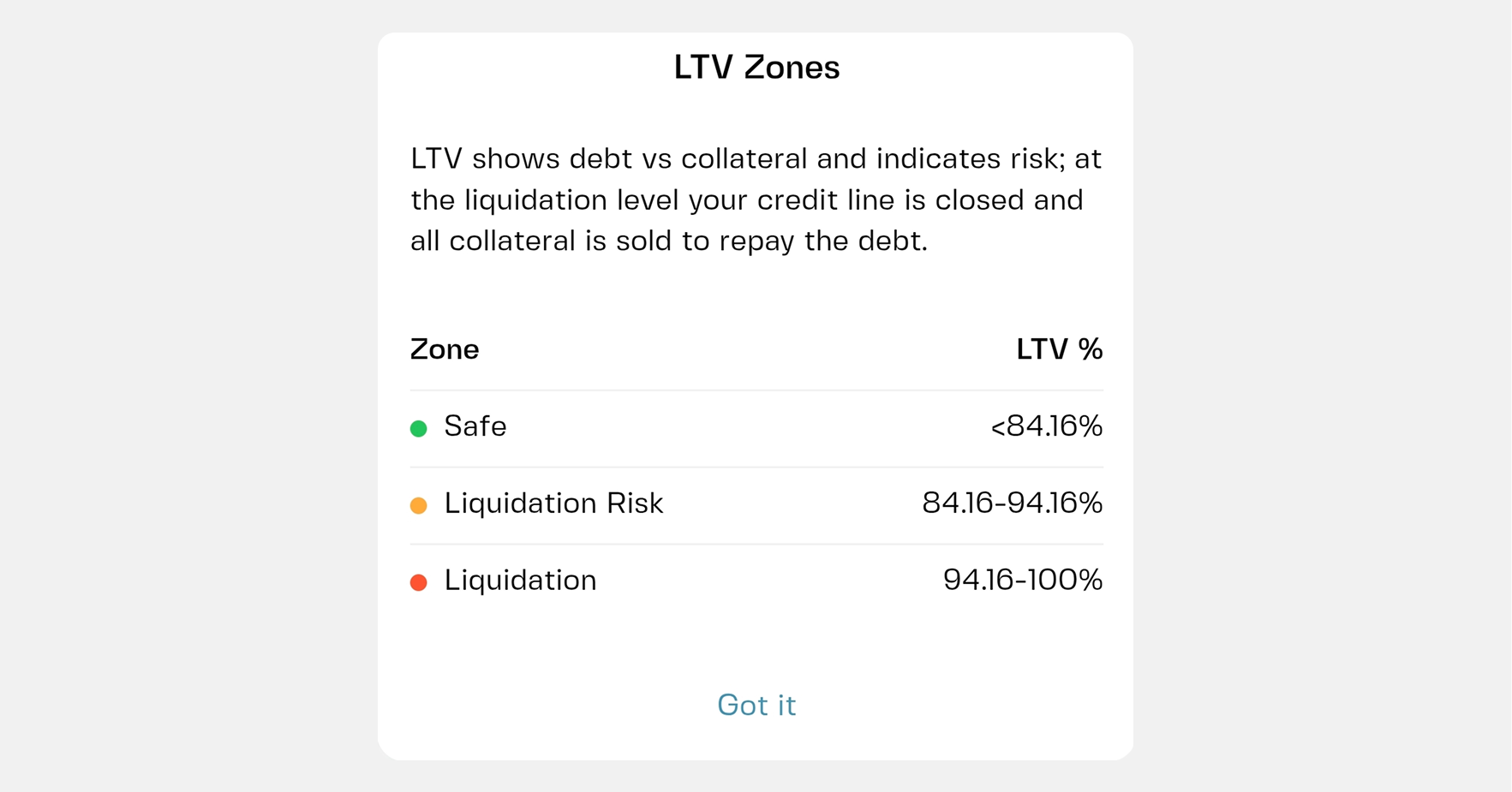
Every credit line has a liquidation threshold — the LTV level at which the position can be closed and part or all of your collateral sold to repay the loan. You can see the exact level for your own loan in the app. Everything below is really about one goal: staying well away from that line.
Your starting LTV matters just as much. On many platforms, the maximum LTV for BTC collateral is 70%, but that's a ceiling, not a target. Borrowing right up to it leaves very little room when prices fall, which is why plenty of people start lower on purpose — the distance between your starting point and the liquidation threshold is your actual safety margin.
Step 1: Switch on alerts
This is the quickest two-part step.
On your phone. Allow notifications for the Clapp app in your phone's settings. A great alert does nothing if your phone silences it. While you're there, check that Do Not Disturb isn't blocking it overnight, or add the app as an exception.
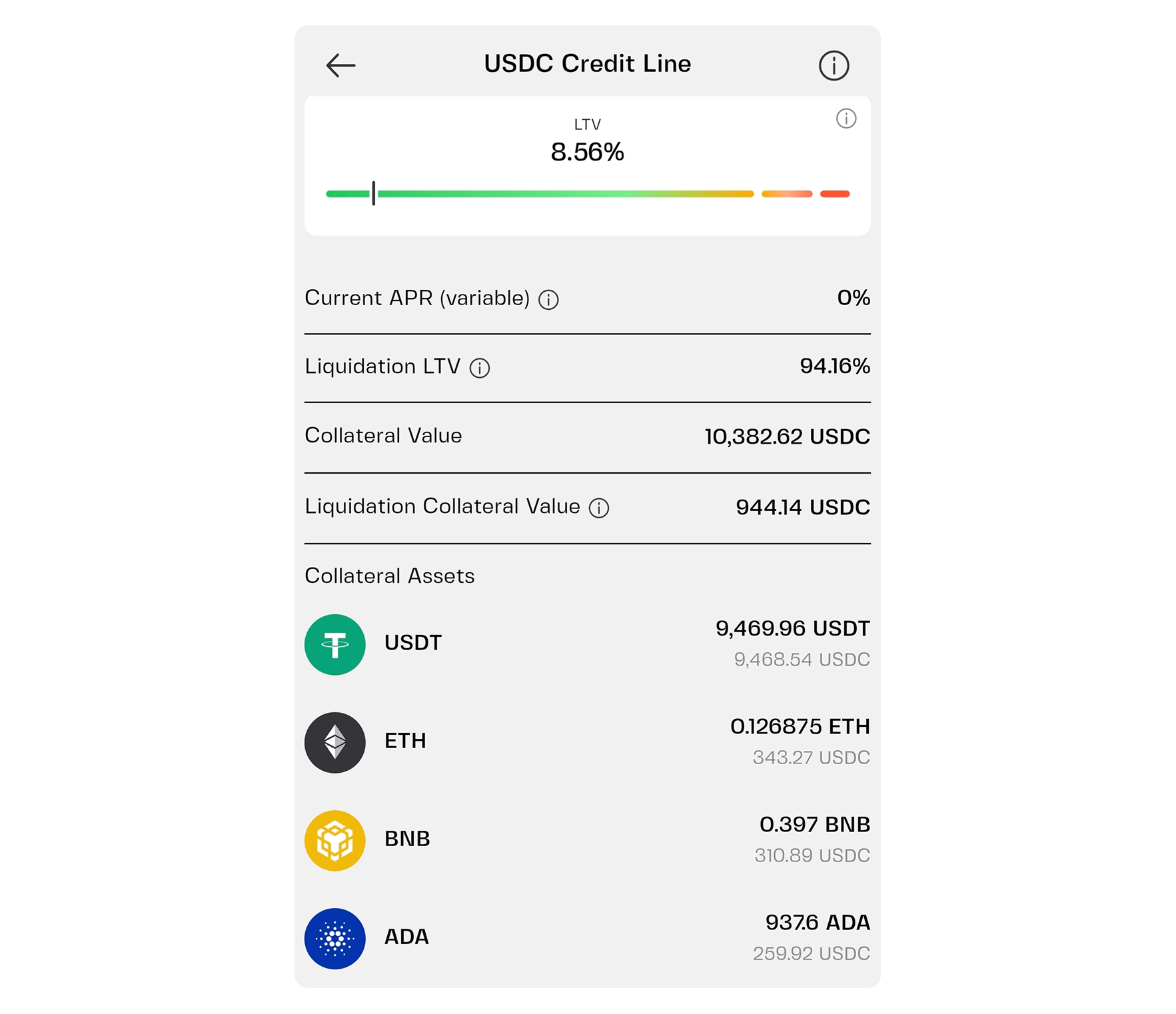
In the app. Open your credit line and review your current LTV, collateral value, and loan amount. This is the screen you'll come back to whenever an alert arrives. Clapp currently highlights four essential data points:
- Liquidation LTV — the LTV level at which your credit line is closed and the collateral is sold to repay the debt
- Collateral value — what your total collateral is worth at current market prices
- Liquidation collateral value — the minimum total collateral value that triggers liquidation for your credit line
- Collateral assets — a list of all assets included in your collateral, with exact amounts and current market value
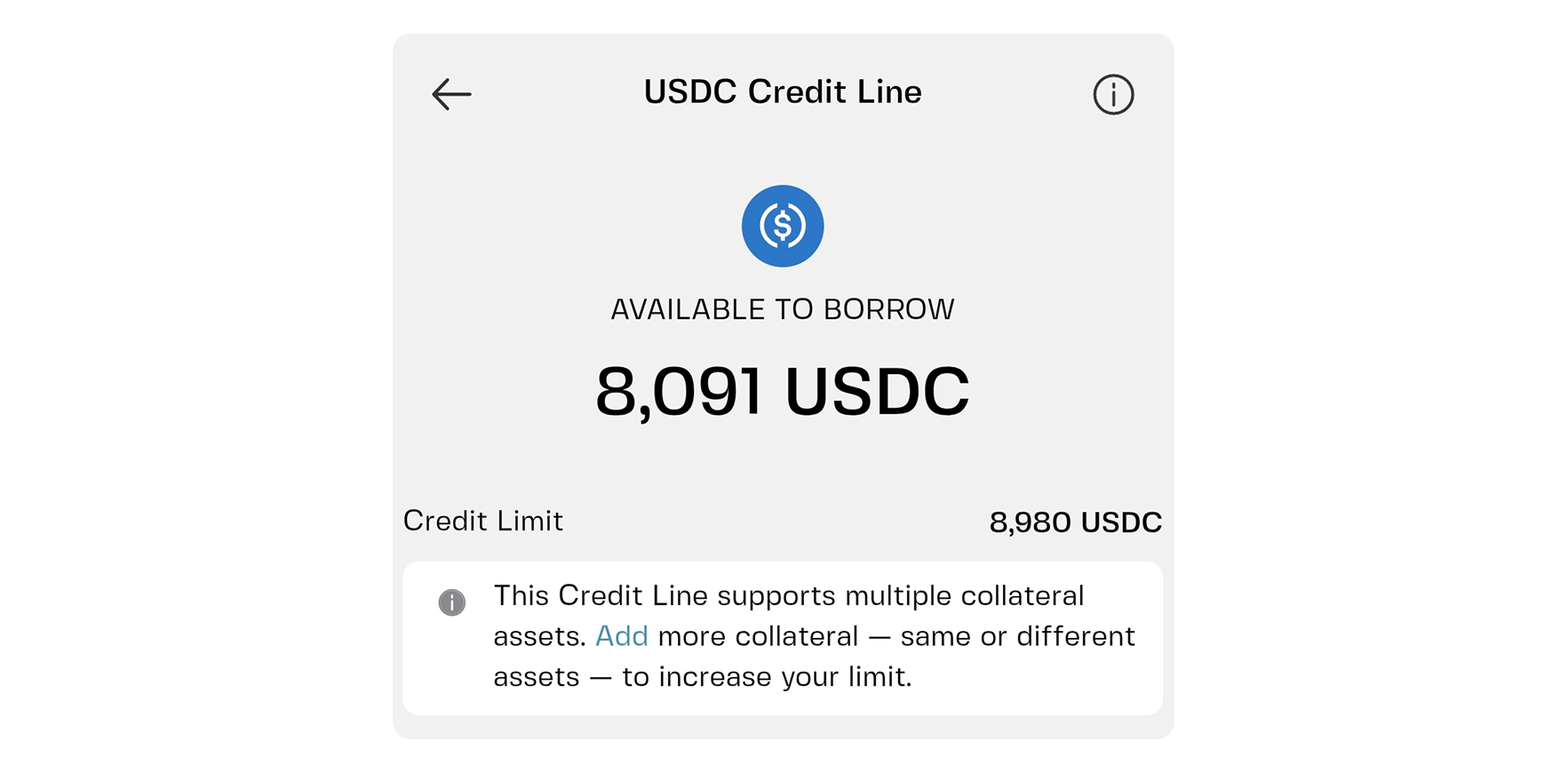
With a multi-collateral credit line, you see both total values across the basket and a per-asset breakdown. The "Manage Collateral" button underneath lets you add more assets or reshuffle the existing pool.
How alerts work
Smart alerts trigger when your LTV approaches critical levels, which can give you time to top up collateral before anything happens. Two caveats are worth knowing upfront.
First, alerts are a convenience rather than an obligation — this is typically spelled out directly in a platform's terms and conditions. Think of the LTV alert crypto loan apps send you as a helper, not a safety net: it's genuinely useful when it arrives, but it isn't guaranteed to. Our guide on where liquidation alerts fit, and where they don't covers this in more detail.
Second, an alert can arrive late, get missed entirely, or get buried under a dozen other notifications during a fast-moving market. Watching your loan is still ultimately your job, which is exactly why steps 2 through 4 matter as much as the alert itself.
Step 2: Set your personal "act" level
An alert tells you the app thinks something's getting close. Your act level is the LTV at which you decide to do something about it, independent of whether an alert ever shows up.
Start by noting your current LTV and your liquidation threshold in the app. Based on the gap between them, pick an act level that leaves you real room, somewhere well before the threshold, not right up against it.
If your LTV is 40% today and your liquidation threshold sits at 90%, you might decide that reaching the halfway point of that gap (65%) is your trigger to act that same day. Halfway is just one reasonable choice, though — our breakdown of LTV and liquidation threshold goes deeper on working out where your own act level should sit.
Write the number down, or save it in your phone's notes, and set a recurring reminder to check your loan once a week or more. The narrower the gap between your LTV and the threshold, the more often you should be checking.
A cautious borrower who travels a lot might want a closer-in act level. Someone who opens the app every morning might be comfortable running a thinner buffer.
Step 3: Keep a top-up reserve
An alert only helps if you can actually act on it. If the plan is "I'll find some extra crypto when it happens," there's a real chance you're scrambling at the worst possible moment, right when prices are low and everyone else is selling too.
A top-up reserve is a set amount you keep in your wallet specifically to protect the loan. It doesn't need to be large. It just needs to be enough that when an alert arrives, you can move within minutes instead of hours.
A few practical points:
- Keep it mentally separate. Label it "loan protection," not spending money or an investment idea.
- Use an asset the credit line accepts as collateral. Availability depends on your country, so check what you can add before you count on it.
- Think about the reserve's own volatility. The more volatile the asset, the faster it can shed value right when you need it most. Stablecoins are the least likely to swing wildly, barring a depeg.
- Size it against a realistic scenario, not a vague worry. How much extra collateral would you need if prices fell by a third? Working that number out properly is the whole point of stress-testing your position before a crash happens, not during one.
If building a reserve right away isn't realistic, consider simply borrowing less, so your starting LTV leaves more room on its own.
Step 4: Know the two ways to bring LTV down
When your LTV climbs toward your act level, you have exactly two levers. Use either one, or both, depending on which you can pull fastest with what you have available.
Option A: Add collateral
You send more crypto to back the same loan. The loan amount doesn't change, but a bigger collateral side pulls the ratio down.
If your loan is €4,000 and your collateral has dropped to €8,000, your LTV is 50%. Adding €2,000 in collateral brings the total back up to €10,000, and your LTV returns to 40%.
This works best when you still believe in your collateral long-term and don't want to sell anything or shrink the loan itself — it's also exactly where your reserve earns its keep. The trade-off is that you're putting more crypto into a position that could still keep falling, though with a multi-collateral credit line, you can always reshuffle the mix afterward.
Option B: Repay part of the loan
You pay down some of what you owe. The collateral stays exactly as it is, but the loan itself gets smaller.
Say your collateral is worth €8,000 and you owe €4,000 (50% LTV). Repay €800, and you now owe €3,200 against the same €8,000, dropping your LTV to 40%.
Repaying makes sense when you'd rather reduce what's at stake than add more crypto to the pile. It also leaves your collateral untouched, so you're not committing extra assets into a falling market. The trade-off is that it requires cash or other funds on hand to do it.
Your collateral is held by Clapp while the loan is open and returns to your wallet once you repay in full, so clearing the balance entirely is also the clean way to close out the position altogether.
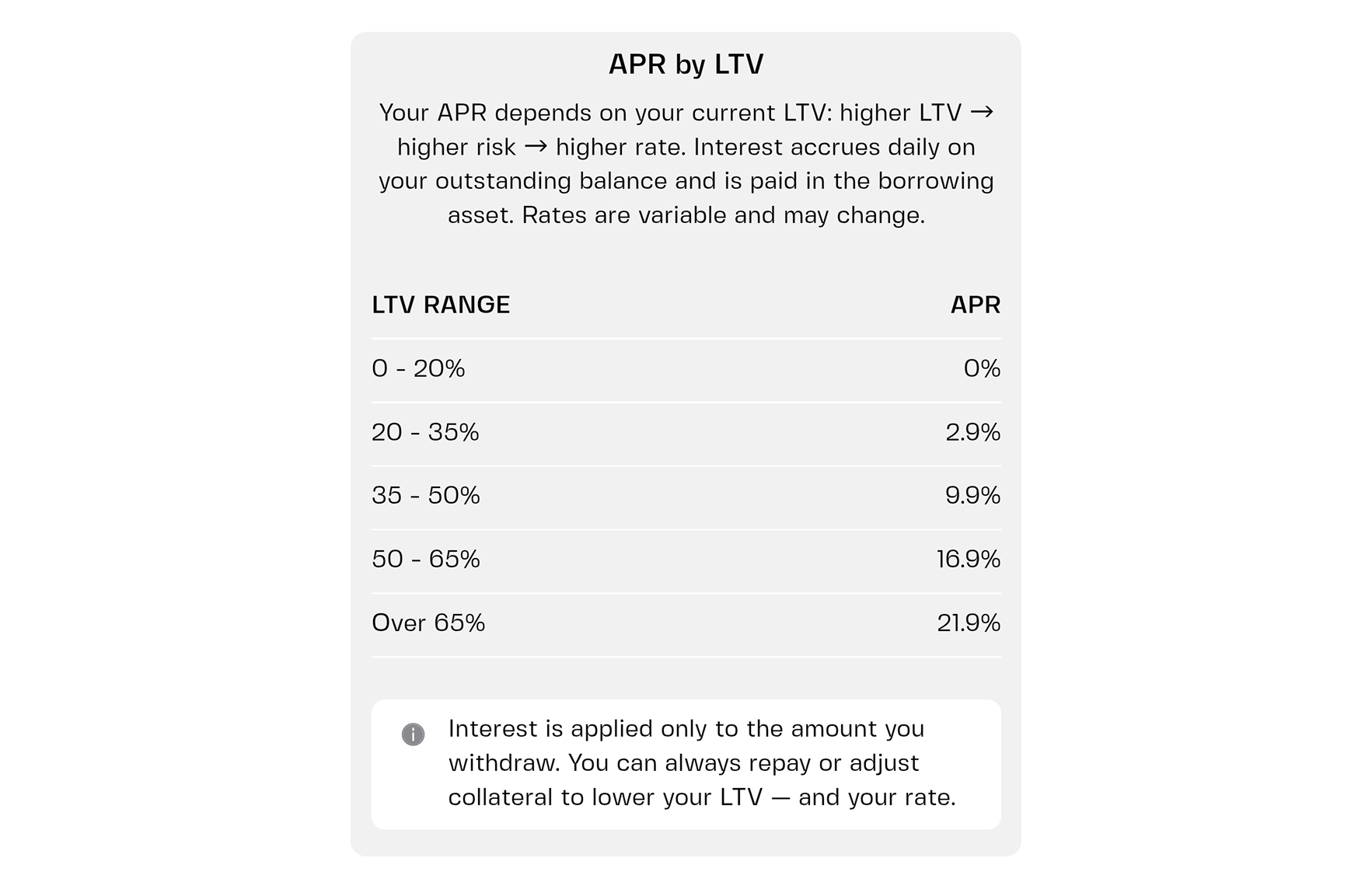
One side effect worth knowing: your LTV band affects the rate you pay too. The APR on a Clapp credit line runs from 0% to roughly 22% depending on the LTV band you sit in, so bringing LTV down may save you on interest as a bonus.
Our guide on how LTV affects your rate goes deeper if you want the full picture, and our piece on how a crypto-backed loan works is a good refresher on collateral, LTV, and repayment from the ground up.
Your five-minute setup
Here's the whole thing in one sitting:
- Allow notifications for the app on your phone, and check Do Not Disturb.
- Open your credit line and note your current LTV, collateral value, and loan amount.
- Find your liquidation threshold and look at the gap.
- Write down your act level, the LTV where you've decided to take action.
- Check your reserve in the wallet. Is there enough to add collateral quickly if you need to?
- Set a weekly reminder to glance at the loan.
When an alert does arrive later, the sequence is short: open the app, check your LTV, compare it to your act level, then add collateral or repay part of the loan. For how this plays out in a genuinely fast-moving market, our guide to what to do when the market crashes walks through that exact scenario.
And that's how to avoid liquidation crypto loan holders worry about: a working alert, a number you chose in advance, and funds ready to move.
Five minutes now, instead of a scramble later
Protecting a crypto-backed loan doesn't take constant screen time. Allow notifications, set your act level, keep a reserve in the wallet, and remember that adding collateral or repaying part of the loan will always bring LTV back down.
One rule of thumb worth keeping in mind: if your LTV is closer to the liquidation threshold than it is to where you started, that's the signal to act today, not next week.
If you already have a loan or credit line open, this is worth doing right now — open the app and take the five minutes.
Frequently asked questions
What is an LTV alert?
An LTV alert is a notification that tells you your loan-to-value ratio is getting close to critical levels. It gives you time to add collateral or repay part of the loan before the position reaches the liquidation threshold. It's a helpful warning, not a guarantee that you'll always be notified in time, so a personal act level is still a good idea.
Do I still need to check my loan if alerts are on?
Yes, a quick weekly look is a good habit. Alerts are a convenience, and notifications can be delayed, silenced, or missed. Checking your LTV regularly, especially after big market moves, keeps you in control.
Is it better to add collateral or repay part of the loan?
Neither is always better. Adding collateral keeps the loan size the same but puts more crypto behind it. Repaying part reduces what you owe and leaves your collateral as it is. Choose whichever you can do fastest and feel most comfortable with.
How big should my top-up reserve be?
There's no single number. A useful way to size it is to imagine a sharp price drop, work out how much extra collateral you'd need to get back to your act level, and keep roughly that amount ready. The more you borrow relative to your collateral, the larger the reserve should be.
What happens if my LTV reaches the liquidation threshold?
The position can be closed and part or all of your collateral sold to repay the loan. That's exactly why it helps to act well before the threshold, using alerts, your own act level, and a ready reserve.