Sending crypto to the wrong network: how to avoid losing funds

Here’s a crypto holder’s nightmare: you copy an address, tap send, and then realize the coins never arrived. The address and the amount were perfectly correct. You just forgot to switch the network in the drop-down, and now your money is sitting somewhere you can’t easily reach.
A common way people lose funds has nothing to do with hackers: it comes down to one rushed click. When sent over the wrong network, crypto may be permanently lost or stranded. Here’s what to check before you send, and what your recovery options may look like.
TL;DR
- A network is the blockchain your transfer travels on. Tokens like USDT and USDC exist on several, so the asset and the network both have to match on each side.
- Wallets usually block a transfer when the address format doesn’t fit the network. But many networks share the 0x format, and in that case nothing warns you.
- Ask the receiver which network they use, then copy the deposit address from their screen after choosing that network.
- Send a small test transaction first for any amount you’d hate to lose. It costs a little extra and proves the route works.
- If it already happened, find your transaction hash and check it in a block explorer. Funds sent to your own wallet on another EVM network are often recoverable, while funds sent to a non-EVM chain usually aren’t.
- Ignore anyone who contacts you offering to recover your money for a fee. They are almost certainly scammers.
What a network actually is
When you deposit or withdraw, a wallet or exchange asks you for two things: the asset and the network. Coins like Bitcoin or ether live on a single native blockchain. But many tokens, especially stablecoins like USDT and USDC, exist on several chains at once (for example, Tron, Ethereum, BNB Chain, Solana or Polygon). Each is a separate network with its own ledger, speed and fees.
Think of it like putting a parcel with a perfect street address on a train heading in the wrong direction. The network is the train line; the address is the door. Careful network selection is the single best habit you can build.
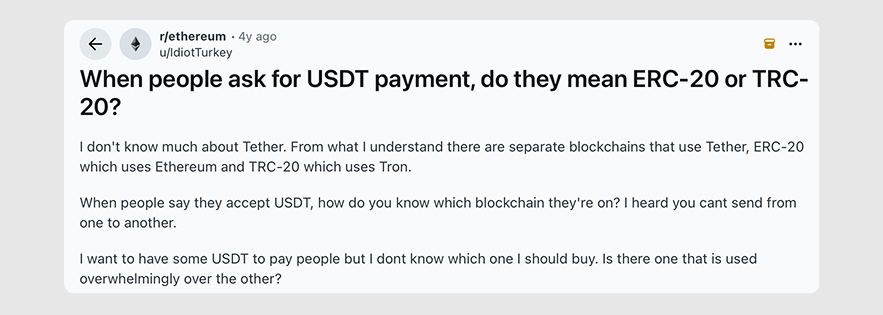
TRC-20 vs ERC-20
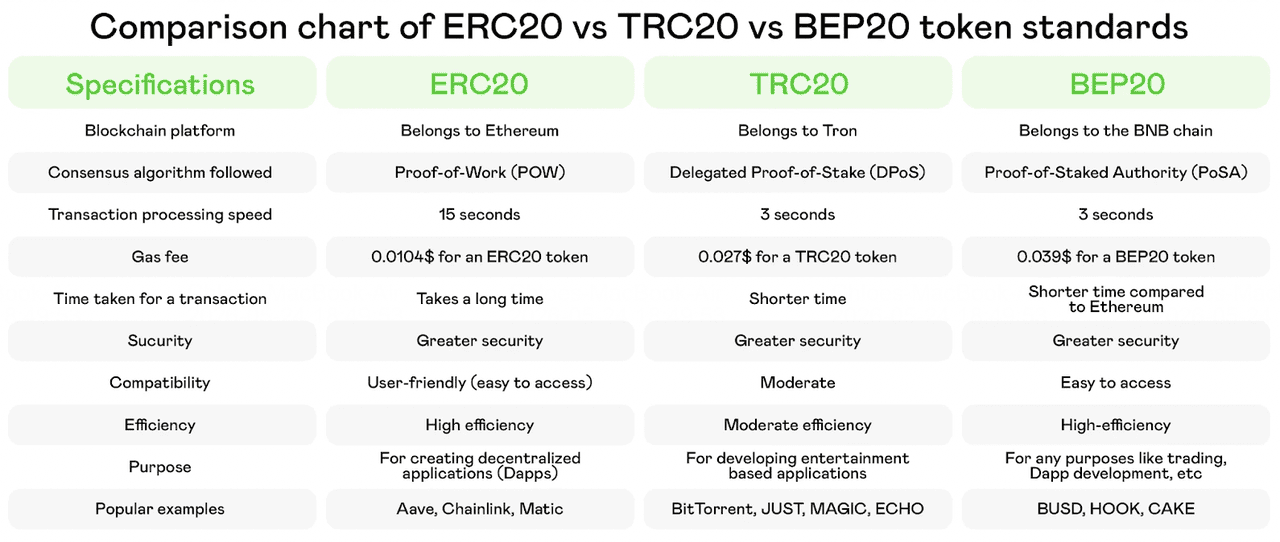
You’ll see these labels all the time, mostly on USDT. ERC-20 is a technical standard for issuing tokens on Ethereum. TRC-20 is its counterpart on Tron. A stablecoin called USDT on both is meant to be worth the same, but its versions live on separate ledgers.
Tron is widely used for stablecoin transfers, particularly on exchanges and in remittances, while Ethereum hosts the largest DeFi ecosystem. In practice, the main differences you’ll feel are:
- Fees. Ethereum fees, paid in ETH, still swing with congestion, but through 2026 they have mostly stayed low, often just cents for a USDT transfer. On Tron, the cost depends on energy: a sender who burns TRX typically pays a few dollars per USDT transfer, while one with staked or rented energy pays far less. Check the live figure, since both change.
- Transaction speed. Tron is often faster (a few seconds versus 15 seconds to a few minutes on Ethereum), but congestion on either can slow things down.
- Support. Not every wallet or platform accepts every network. A service might take USDT on Tron but not on Ethereum, or the other way round.
BEP-20 is another standard for USDT, popular within the Binance ecosystem and in DeFi apps like PancakeSwap. Like Tron, it settles transfers quickly, and fees, paid in BNB, are typically well under a cent.
If you’re holding stablecoins and wondering where to keep them, here’s a checklist of things to consider before parking stablecoins.
Why addresses can look right and still be wrong
Distinguishing between Ethereum and Tron addresses is relatively simple; beyond them, it gets sneaky. Some networks use address styles that overlap:
- Tron (TRC-20) addresses include 34 characters (a string of letters and numbers) and start with a capital T.
- Ethereum (ERC-20) addresses start with 0x followed by 40 characters.
- BNB Chain, Polygon, Arbitrum, Base and other Ethereum-compatible networks also start with 0x.
- Bitcoin addresses typically start with 1, 3 or bc1.
- Solana addresses are a long string of letters and numbers with no standard prefix.
Most wallets detect a format mismatch if you try to send USDT on Ethereum to a Tron address. You’ll see an error notification, and the transaction won’t go through. That’s a helpful safety net.
But what if the formats match? An address that starts with 0x is valid on Ethereum, BNB Chain, Polygon and many others. If you send USDT on BNB Chain to a deposit address meant for Ethereum, the transfer will go through without a warning. The receiving platform just won’t see it where it expects to.
In a wrong-network crypto transfer, the blockchain does exactly what you told it to. It just isn’t what you meant.
Common wrong-network mistakes
Losses tend to follow a few patterns. See if any look familiar.
- Picking the default without looking. Many apps pre-select a network, or list the cheapest one first. Don’t tap through on autopilot.
- Trusting the coin name. “It’s USDT, and they accept USDT” isn’t enough. The ticker alone tells you nothing about the network.
- Reusing an old address. Suppose you saved an address last year for one network and use it for another. With 0x addresses, the app won’t complain. Pasting from your transaction history also exposes you to address poisoning: scammers send tiny “dust” transactions from lookalike addresses, hoping you’ll copy theirs instead of the real one.
- Forgetting the memo or tag. Some networks, such as the XRP Ledger, Stellar and TON, need an extra memo or tag to credit the right account on a shared deposit address. Leave it out and the funds can arrive without being matched to you. Not strictly a network error, but it may cause the same panic.
- Mixing up similar names. Ethereum and Ethereum Classic are separate networks that use the same 0x address format, so picking the wrong one in a drop-down triggers no warning. Layer-2 options can be just as easy to confuse: Arbitrum One and Arbitrum Nova, for instance, are different chains. Zoom in and read the whole label.
- Moving funds in a hurry after a conversion. You swap into a different asset, then rush to send it out. Before you start moving money around, it helps to know what swap and convert buttons do.
A five-step check before you press send
You don’t need a complicated routine, just a few steps you actually follow every time.
Step 1: Ask the receiver which network they use
If you’re paying a person or a business, ask them directly: “Which network should I use for USDT?” If you’re withdrawing to your own account elsewhere, open that account’s deposit screen first. Don’t guess.
Step 2: Copy the deposit address from the receiving side
On the receiving platform, choose the asset, then choose the network, and only then copy the deposit address. Many platforms show a different address for each network. If you switch the network, the address often changes too.
Step 3: Match the network on both sides
Put the two screens side by side, mentally or literally. The sending screen says Tron (TRC-20)? The receiving screen must say Tron (TRC-20). Same words, same standard. Don’t accept “close enough.”
Step 4: Check the first and last characters of the address
Read the start and the end of the address, not just the middle. Copy-paste tools and malware can swap an address for a lookalike. Make sure the first few and last few characters match what you expect, and check the prefix (T, 0x, bc1) against the network you picked.
Step 5: Send a small test transaction first
For anything meaningful, send a small amount first. A test transaction costs you a bit extra in network fees, but it proves that the route works. Wait until it shows up on the other side, then send the rest. It’s a bit slower, but experienced users swear by it, because it turns a possible total loss into a small, cheap lesson.
A wallet that lays out each choice on its own screen helps. In most wallets, including the Clapp wallet, you choose the asset first and the network second, which gives you a natural point to slow down and read.
What to do if you already sent it
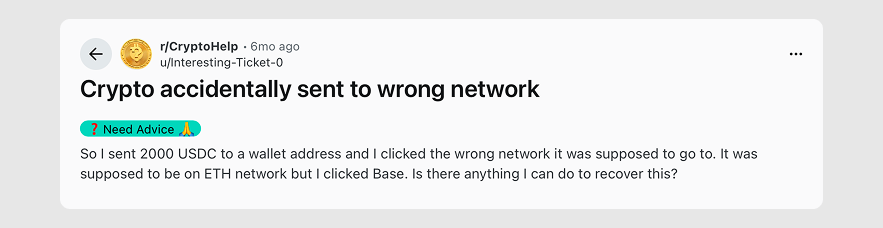
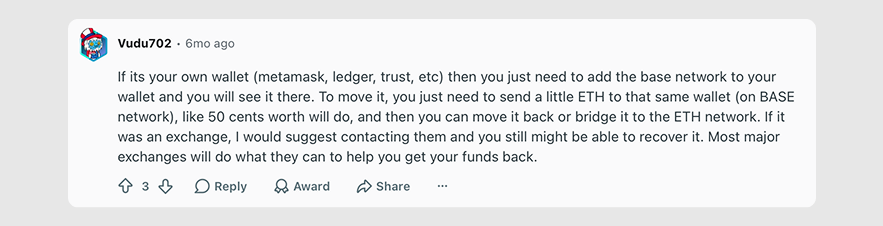
Don’t panic. You may still have options, depending on who controls the receiving address and whether the network is EVM-compatible (Ethereum Virtual Machine). For example, both Ethereum and Base are EVM-compatible, so the Reddit user below may have a way to recover their funds.
Start by finding your transaction ID (hash). Paste it into a block explorer for the network you used and confirm what happened: did it complete, and to which address? Next, work out where the money went.
If you sent to your own EVM-compatible wallet
If it’s your own self-custody wallet (e.g., Trust Wallet or MetaMask) on a different network, those funds are not lost, but stranded. Since you control the seed phrase or private keys, you can open that wallet and switch the active network to the blockchain you accidentally sent the funds to.
If the token doesn’t show up automatically, click Add Token or Import Tokens and paste the token’s contract address for that network. Once visible, you can either bridge them back to the correct network or send them elsewhere.
Note that moving or bridging tokens requires paying gas fees. You will need a small amount of the native coin of the network where the funds landed (like BNB for BNB Chain or POL for Polygon) in that wallet.
If you sent to a centralized exchange
Some major exchanges have automated or manual recovery tools. If you sent to an address held by a platform, contact its support team quickly. Provide the transaction hash, the amount, the asset, the network used and the network you intended. Some platforms can retrieve funds sent on the wrong but supported network. Others can’t, or charge for the work, and it can take days or weeks.
If you sent to a non-EVM network
The worst-case scenario is sending an EVM asset to a non-EVM chain like Solana or Bitcoin. As the addresses and cryptographic key derivations are fundamentally different, these funds are generally unrecoverable unless the entity controlling the destination address offers a manual intervention, which is very unlikely.
Be wary of "recovery services"
Anyone who contacts you first, promises to get your money back, or asks for your seed phrase or an upfront payment is almost certainly a scammer. Never trust third parties on social media claiming they can recover exchange funds for a fee.
Be honest with yourself about the odds. If the receiving address isn’t controlled by anyone who can access that network, the funds may be gone for good. That’s why prevention beats any cure.
Sending to the wrong network is rarely about bad luck
More often, it’s down to simple inattention. Ask the receiver, match the network on both sides, check the address prefix and send a small test first. Do that every time, and a wrong-network mistake becomes very unlikely. Explore how asset and network choices are laid out in the Clapp app before you send.
Network errors aren’t the only way to lose crypto. Understanding how MPC wallets protect your crypto shows how the custody side of safety works, and a crypto app security checklist covers the account protections to switch on before you ever hit send.
Frequently asked questions
What happens if I send crypto on the wrong network?
It depends. If the address format doesn't match the network, your wallet will usually block the transfer. If the format is shared, such as 0x addresses across Ethereum-compatible networks, the transfer goes through but may not show up where you expected. Recovery is sometimes possible, but it's never certain.
Can I get my crypto back after a wrong network transfer?
Sometimes. If you control the receiving address, you may be able to access the funds by using the same wallet on the network where they landed. If the address belongs to a platform, its support team may be able to help, although it may take time and isn't always offered. Contact them quickly with your transaction hash.
What’s the difference between TRC-20 and ERC-20?
Both are token standards. TRC-20 runs on the Tron network and ERC-20 runs on Ethereum. A stablecoin like USDT can exist on both, but they are separate versions on separate ledgers. They have different address formats and fees, and not every platform supports both.
How do I know which network to choose?
Ask the receiver, or open the deposit screen of the platform you're sending to. Choose the asset, then the network, and copy the address shown for that exact network. Your sending network must match it.
Do all coins have the wrong-network risk?
Not equally. Native coins like Bitcoin mostly live on one network, so there's less to confuse. The risk is highest for tokens that exist on many networks, like USDT and USDC, and for networks that share address formats.
Is a test transaction really worth it?
For any amount you'd be upset to lose, yes. You pay a small extra network fee, and in return you confirm the route works before you commit the full amount.